
Live NetSuite reporting, inside Excel
Build refreshable reports, drill into every number and share polished views with Solution 7 by Zone. No re-exporting every time the numbers change.
%20copy.avif)

Trusted by finance teams at 4,500+ organizations
















.avif)











With live NetSuite data
Solution 7 by Zone for Excel-based reporting
To start building reports
Spent reporting
Remove reporting friction with our NetSuite Excel tool
Solution 7 by Zone keeps Excel tied to live NetSuite data, so reports, packs and plans stay current without exports or rework.
Bring live NetSuite data into Excel
Reports go stale fast, leaving finance confirming which file is current. Solution 7 is the Excel NetSuite plug-in tool that keeps data live. Teams can refresh a workbook, worksheet or single cell and numbers update instantly.
Reuse the same report framework
Every reporting cycle means separate NetSuite exports lined up and combined into one pack. With Solution 7, build the framework once and reuse it → multi-entity reports, management packs and comparative views in Excel, with the data still tied to NetSuite.
Build reports your way
Boards and executives rarely want reports in the format they came out of NetSuite. Solution 7 gives you full control over layout, comparative views, logic and formatting in Excel. The pack is built the way your audience reads it, with numbers tied to the ERP.
Pull in the data you need
Building a custom view usually means jumping between systems or memorizing internal IDs. Solution 7's filters and insert functions pull NetSuite data around the dimensions your team actually uses — dynamic customer views, entity comparisons and recurring reports included.
Keep Excel working like Excel
A new filter, entity view or planning assumption can send finance back to rework formulas and recheck that everything ties out. With Solution 7, the workbook behaves the way your team expects — copy formulas, fill down and total as usual, with live data underneath.
Create reports that are ready to share
A summary figure looks right until someone asks what's behind it — then finance spends more time proving the number than discussing it. Solution 7 builds polished reports with drill-down support, from summary figure to supporting detail to the NetSuite record.
Keep planning connected to NetSuite
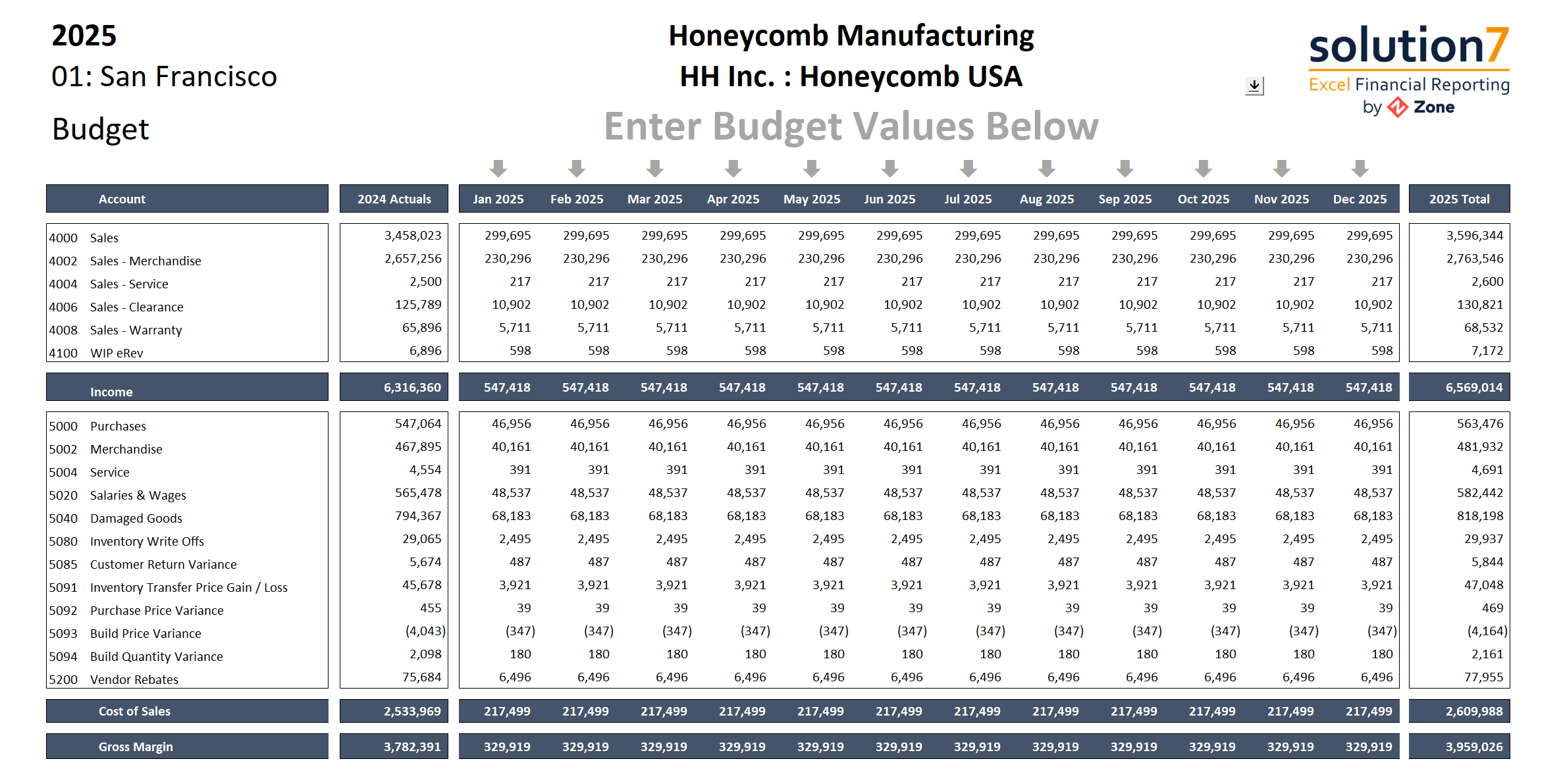
Planning and forecasting drift from the ERP fast, kept current through repeated uploads and version checks. Solution 7 brings actuals, budgets, prior-year results and rolling forecasts into Excel — compare versions, update models and move approved plan data forward.
See how finance teams put Solution 7 to work
"In the past we couldn't find a lot of time to do reporting. Now we spend the same amount of time running more reports and reporting in ways not previously possible."
“One of my favorite features from the Solution 7 offering is the flexibility I have in consolidating GL accounts, and then I can bring it in at an individual GL account level or I can bring it in through a range or even through a named array.”

"Implementing Solution 7 by Zone & Co was a snap. We simply ran the client instal, Configured NetSuite SuiteAnalytics Connect and away we went."
“Month-end reporting went from being finalized four or five days after month-end close to being available as soon as the month-end closed.”
Get a Personalized
Demo Today
Discover how our innovative solutions are tailored to your specific business needs. Streamline your back-office operations, enhance efficiency and drive your business forward.

Explore our resources











.png)


Frequently asked questions
Why should I integrate NetSuite with Excel for reporting?
You should integrate NetSuite with Excel for reporting if your team wants Excel’s flexibility without relying on manual exports, stale files or version confusion. A NetSuite Excel tool like Solution 7 keeps NetSuite as the source of truth while giving finance live reporting, stronger controls and a cleaner NetSuite Excel integration for building and refreshing reports.
You also get:
- Faster monthly close by removing manual spreadsheet prep
- Stronger financial controls – NetSuite stays the system of record
- More flexible reporting and modeling for FP&A, controllers and accounting
- Elimination of manual exports and data discrepancies
In short: you get the speed and usability of Excel with the accuracy and governance of NetSuite – without introducing a traditional “integration” that moves or duplicates ERP data.
How does Solution 7 by Zone work with NetSuite?
Solution 7 by Zone is an Excel plug-in that creates a bi-directional data flow between Excel and NetSuite. Your team can work with live data from your ERP to build refreshable reports, planning models and analysis without having to re-export every time the numbers change.
That keeps Excel as the working environment while NetSuite remains the source behind the data. It also makes it easier for non-NetSuite users to view and query reports and dashboards in a format they already know.
How long does it take to implement Solution 7 for my organization?
Most organizations are up and running within an hour. Solution 7 by Zone installs directly in Excel and works with the NetSuite and Excel skills your team already has. Once you connect NetSuite to Excel, your team can start building financial reports, management packs and planning models in minutes.
What kind of reports can be built within Solution 7?
A wide variety of Excel financial reports, forecasts and statements can be built with Solution 7. If you want to integrate NetSuite with Excel for reporting, Zone’s tool supports consolidated P&L, balance sheet, cash flow, multi-company and multi-currency reporting.
Is it possible to build custom calculations or add charts and graphs?
Yes. With Excel’s ability to draw data from multiple sources, you can build complex formula-driven forecasts and models based upon information that goes beyond the financial data in the general ledger. That can include non-posting transaction data such as sales orders and purchase orders, along with statistical accounts and other non-financial details.
You can also use Microsoft Excel charts, graphs and pivot tables to shape the output the way your team wants to review it.
How does the Solution 7 NetSuite Excel tool handle complex financial models and dynamic revenue scenarios?
Solution 7 handles complex financial models and dynamic revenue scenarios by keeping live NetSuite data connected to Excel, so teams can update models without rebuilding them around static exports. That gives FP&A and accounting a cleaner way to manage advanced planning, rolling forecasts, multi-entity consolidations, revenue waterfalls, allocation scenarios and rapid re-forecasting inside the Excel models they already use.
Can the Solution 7 NetSuite Excel solution automate planning and budgeting directly in Excel?
Yes, Solution 7 can automate planning and budgeting by letting your team work in Excel while still using up-to-date data from your ERP. Instead of exporting static numbers or rebuilding templates every cycle, you can pull in up-to-date actuals, financial forecasts and transactional detail with the Excel NetSuite integration tool’s automatic data refresh.
This keeps planning and budgeting closer to current NetSuite data without requiring a separate planning system.
Here’s what teams typically automate with Solution 7:
- Refreshing actuals and variances directly from NetSuite
- Updating rolling forecasts and working budget models
- Building scenario analysis using live ERP data
- Reducing manual exports and version-control issues
Solution 7 doesn’t attempt to replace enterprise forecasting platforms. It enhances the tools your team already knows. Finance teams get a practical, more connected way to manage NetSuite planning and budgeting without adding another system to the tech stack.
Does Zone’s solution for connecting Excel to NetSuite support global reporting?
Yes. Zone fully supports multi-entity and global financial reporting needs, making it a strong fit for organizations operating across regions. With built-in capabilities to automate NetSuite invoice data to Excel, consolidate multi-currency actuals and share reporting outputs, teams can deliver accurate, consistent insights for worldwide reporting without as much manual consolidation and report reshaping.
How secure is the Solution 7 NetSuite Excel connector?
Solution 7 is secure because it connects to NetSuite through the native SuiteAnalytics Connect module and respects NetSuite’s existing permissions. Data flows directly between your users’ machines and NetSuite’s servers, and none of your ERP data is transferred to or through Zone or Solution 7 servers or infrastructure
Is Solution 7 compatible with NetSuite Next?
Yes. Solution 7 works in both traditional NetSuite accounts and accounts running NetSuite Next. We test Solution 7 against NetSuite Next through Oracle's SuiteCloud Developer Network preview access, so it keeps working as Oracle rolls Next out to your account – no migration, no reconfiguration and no extra work on your end. Solution 7 carries our NetSuite Next Ready badge.
