Over half of all finance teams spend 10 or more hours every week manually processing invoices, chasing approvals and reconciling payments. When AP operations rely on paper invoices, email approvals and spreadsheet tracking, delays happen. Errors compound, payments get delayed and your team is stuck in administrative work instead of strategic analysis.
If this sounds familiar, your AP team would benefit from understanding how to automate accounts payable processes.
Accounts payable automation eliminates the manual tasks that slow down your close cycle and create compliance risk. AP automation helps you digitize invoice capture and integrate directly with your ERP. Cut processing time, slashes errors, and free your team to focus on cash flow forecasting and vendor strategy instead of data entry.
Key highlights
- Accounts payable automation uses software to digitize invoice capture, route approvals and process payments without manual data entry or paper-based workflows.
- Finance teams gain real-time visibility into cash flow, outstanding liabilities and payment schedules through centralized AP dashboards.
- Native ERP integration eliminates sync delays and keeps all AP data, approvals and audit trails inside your system of record.
- Zone & Co delivers NetSuite-native AP automation that handles invoice capture, approvals and reconciliation without third-party integrations.
What is accounts payable automation?
Accounts payable (AP) automation is software that digitizes and automates the invoice-to-payment workflow, eliminating manual data entry, paper invoices and email-based approval processes.
Your team isn’t receiving paper invoices, manually keying data into your ERP and chasing approvals through email chains. Instead, AP automation solutions capture invoice data automatically, route approvals based on pre-configured rules and update your general ledger in real time without manual intervention.
These tools address the bottlenecks that slow down traditional AP processes, including invoice data entry errors, lost invoices, approval delays and reconciliation mismatches.
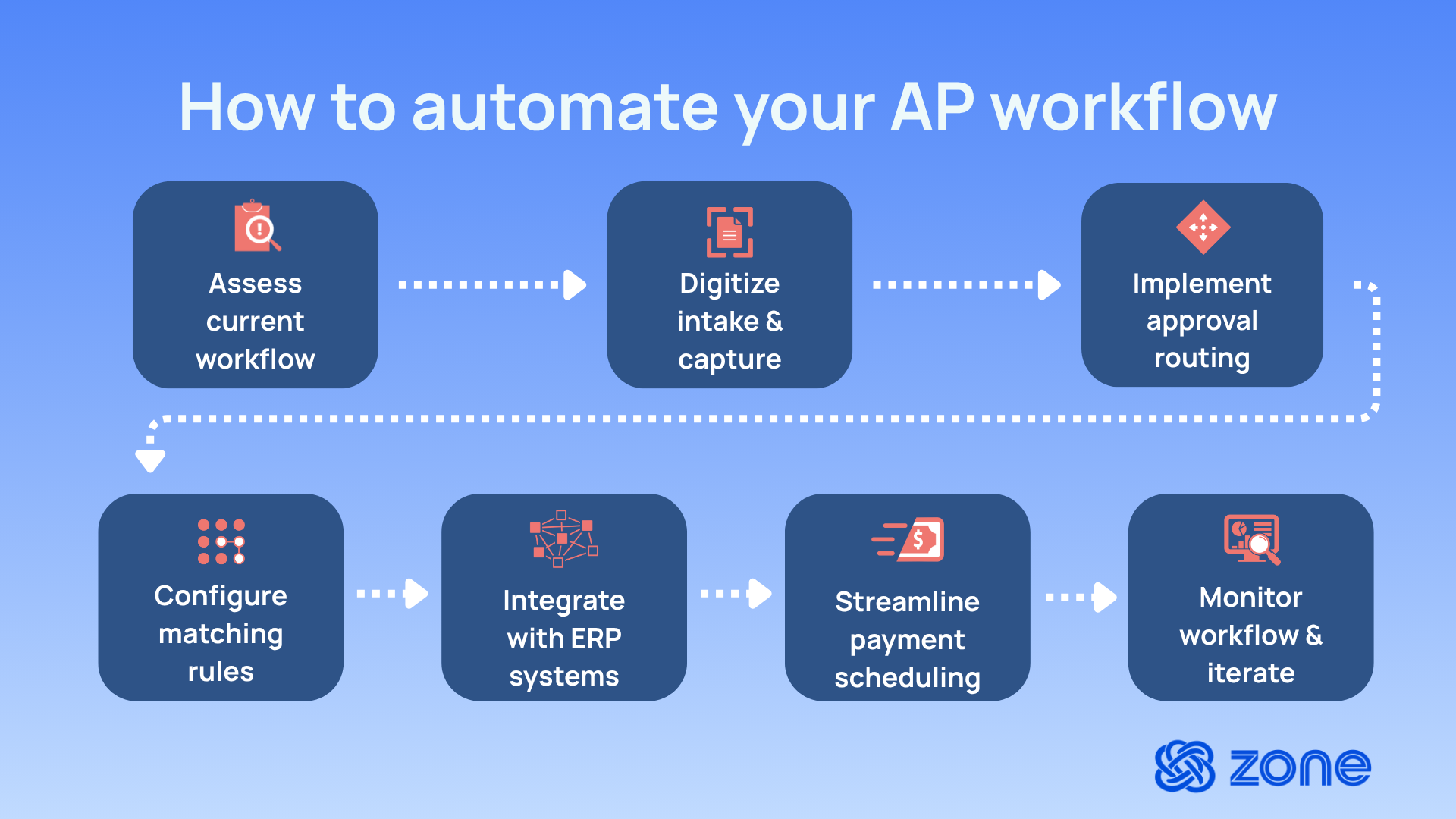
7 steps for automating accounts payable
The right AP automation software won’t fix broken processes. It’ll just execute them faster. Before investing in technology, you need a process worth automating. That means understanding where invoices actually get stuck in the process, why they get stuck there and how a streamlined workflow could reduce those friction points
Here’s how to automate accounts payable workflows that scale.
1. Assess current accounts payable workflows
Before evaluating automation vendors, document how AP works today. Not how your procedures manual says it should work, but how invoices actually flow through your organization. Map every step, including where invoices arrive, who enters data, how approvals happen, where bottlenecks occur and which exceptions require manual intervention.
This assessment exposes the problems automation needs to solve. Are invoices getting lost between email and your accounting system, or are approvals delayed because managers don’t check email? If you skip this step and jump straight to automation, you’ll replicate inefficient workflows in expensive software.
2. Digitize invoice intake and capture
Paper invoices are where AP automation provides the most immediate value. Instead of manually typing each line from PDFs or paper into your ERP, optical character recognition (OCR) technology extracts invoice data automatically.
The goal is to eliminate manual data entry entirely. Vendors can email invoices directly to a dedicated inbox, where the system captures them automatically. The more invoice data you capture digitally, the fewer errors enter your system and the faster invoices move through your workflow.
3. Implement approval routing
Manual approval processes are why AP automation exists. Automated approval routing sends invoices to the right approvers based on rules you define: invoice amount, department, GL account or vendor. Standard invoices below threshold amounts can auto-approve instantly.
The system needs to handle real-world approval scenarios. What happens when an approver is out of office? Can approvals be delegated? Can managers approve batches of invoices at once? If your approval workflow doesn’t accommodate your team’s reality, adoption collapses.
4. Configure matching and validation rules
Three-way matching – which involves comparing purchase orders, receiving records and vendor invoices – prevents paying for goods you didn’t receive or amounts that don’t match what you ordered. AP automation matches automatically: when an invoice arrives, the system checks whether you have a corresponding PO, whether goods were received and whether amounts align within acceptable tolerances.
Validation rules catch errors before invoices enter your approval workflow. Is this a duplicate invoice? Does the GL coding match your chart of accounts? Does the amount exceed the approved PO value by more than 10%?
5. Integrate AP automation with ERP systems
AP automation that sits outside your ERP creates the problem it’s supposed to solve, including disconnected data, manual reconciliation and sync delays. Native integration means the automation tool works inside your ERP using the same vendor records, GL accounts and payment terms your finance team already maintains. When an invoice is approved, it posts to your ERP immediately.
Integration complexity scales with your organizational structure. Multi-entity businesses processing invoices in multiple currencies across subsidiaries need integration that handles intercompany transactions and entity-specific approval workflows without manual workarounds.
6. Streamline payment scheduling and reconciliation
Approved invoices need to be paid on time – not so early you hurt cash flow, not so late you damage vendor relationships. Payment automation schedules payments based on due dates, early payment discount terms and cash availability. The system can process invoices individually or batch payments to the same vendor, generating payment files for ACH or wire transfer.
Reconciliation ensures payments in your bank account match payments in your accounting system. Automated reconciliation compares payment files to bank statement transactions, matches them based on amount and date and flags discrepancies for investigation. This prevents duplicate payments and keeps your cash accounts accurate.
7. Monitor performance and continuously optimize workflows
AP automation doesn’t end at go-live. The first 90 days expose workflow gaps, misconfigured rules and training deficiencies you didn’t catch during testing. If you’re not monitoring how the system is being used and where invoices are getting stuck, you’ll miss opportunities to fix issues before they become permanent workarounds.
Track the metrics that matter: invoice processing time, approval cycle duration, exception rates and early payment discounts captured. Continuous improvement means regularly reviewing these patterns and adjusting rules, thresholds and workflows based on what you learn.
Benefits of leveraging an automated accounts payable platform
The case for AP automation isn't theoretical – finance teams see measurable time savings, cost reductions and accuracy improvements within weeks of implementation. Here's what automated accounts payable platforms enable.
Reduce manual data entry and processing errors
Before: AP teams spend hours opening invoices, typing data into the ERP, checking values line by line and fixing mistakes later when something doesn’t match. Even when the process works, it absorbs time that finance could be spending elsewhere.
After: Invoice data is captured earlier and validated sooner with automated invoice capture. That reduces avoidable errors before they move into approvals, payment runs or reconciliation. AP spends less time on repetitive entry and more time reviewing the exceptions that need human judgment.
Accelerate invoice processing and payment cycles
Before: Manual invoice processing can take four to seven days for most organizations, according to the American Productivity & Quality Center. Invoices often sit still for reasons that have nothing to do with policy. Someone forgets to forward an email. An approver misses the request. Finance has to chase people manually just to keep invoices moving.
After: Invoices route automatically based on pre-set rules. Approvals become easier to track, delays are easier to spot and payment timing becomes more predictable. The result is shorter invoice processing from invoice receipt to approved liability and fewer avoidable slowdowns in the workflow.
Improve financial visibility and cash flow management
Before: Outstanding liabilities are often buried across inboxes, spreadsheets and disconnected tools. Finance can estimate what is due, but getting a clean short-term view of approved invoices and scheduled payments takes extra work.
After: AP activity becomes easier to see in one structured workflow. Finance gets better visibility into what is pending, what is approved and what is due next. That makes cash flow optimization more reliable and gives leadership a clearer view of upcoming outflows.
Strengthen compliance and audit readiness
Before: Audit support depends on how quickly the team can pull together invoice copies, approval history and supporting documentation from multiple places. Even where controls exist, proving them can take too much manual effort.
After: Approval history, timestamps and invoice records are easier to retrieve because they are tied to the workflow itself. Finance spends less time reconstructing the story of a transaction and more time responding with confidence when auditors ask for evidence.
Lower operational costs for finance teams
Before: The cost of AP is not just labor. It is also the hours lost to rework, bottlenecks, payment errors, missed discounts and month-end clean-up that happens because the process stayed manual for too long. A Goldman Sachs report found that manually processing invoices can cost $9.39 to $22.26.
After: A more structured AP workflow reduces the administrative burden across the process. Teams can handle more volume without increasing headcount at the same pace and finance can redirect effort toward analysis, control and planning rather than repetitive processing.
Improve vendor relationships and payment accuracy
Before: Vendors feel the effects of weak AP processes quickly. Late payments, inconsistent communication and avoidable errors create friction that AP then has to manage manually.
After: Vendor payments become more accurate, status is easier to track and finance has more control over timing. That leads to a smoother experience for suppliers and fewer avoidable disputes for the AP team to resolve.
Top accounts payable automation platforms for efficiency
Finance teams can choose from several AP automation platforms depending on their ERP environment and workflow complexity. Here’s how leading solutions compare:
What features to look for in accounts payable automation tools
Choosing the right AP automation platform requires evaluating functionality that supports efficient finance operations. Here’s what matters:
- OCR and intelligent invoice capture: The system should extract invoice data automatically from PDFs, emails and scanned documents with 95%+ accuracy, learning from your historical formats to handle complex invoices with multiple line items and foreign currencies.
- ERP-native integrations: AP automation should work inside your ERP using native data structures rather than requiring third-party middleware or nightly batch syncs. Native integration eliminates data silos, maintains real-time accuracy and ensures vendor records stay synchronized without manual reconciliation.
- Automated approval workflows: The platform should route invoices to appropriate approvers based on amount, department and vendor rules, support mobile approvals, handle delegation when approvers are unavailable and allow batch approvals for efficiency.
- Three-way matching: Automation should compare purchase orders, receiving records and vendor invoices automatically, flag exceptions that fall outside acceptable tolerance ranges, handle non-PO invoices with appropriate approval controls and prevent duplicate payments.
- Payment scheduling and reconciliation: The system should optimize payment timing based on due dates and early payment discount terms, support multiple payment methods (ACH, wire transfer, virtual cards), batch payments to reduce transaction costs and automatically reconcile payments against bank statements to catch errors or fraud.
- Reporting and audit trails: AP automation should maintain complete audit trails showing who captured, approved and paid each invoice with timestamps, provide real-time dashboards tracking invoice status and approval bottlenecks, generate spend analysis reports by vendor and department.
Enable accounts payable workflow automation with Zone & Co
Zone & Co delivers NetSuite-native AP automation solutions that eliminate manual invoice processing without forcing your finance team to work across multiple systems. Unlike third-party AP automation software that creates data silos, Zone works entirely inside NetSuite.
What Zone & Co enables:
- AI-powered invoice capture with up to 99% accuracy
- Automated approval routing based on your rules with mobile support
- Three-way matching that handles exceptions automatically
- Native NetSuite integration with zero sync delays
- Multi-entity and multi-currency support that scales
- Built-in bank reconciliation and payment scheduling
- Complete audit trails and compliance controls
Zone & Co customers process invoices significantly faster, reduce data entry errors and cut AP operational costs, all while maintaining audit-ready controls and real-time cash flow visibility inside NetSuite.
Book a demo today and learn how to automate accounts payable with Zone & Co.