It’s the third day of month-end close. Your bank portal is open on one screen, NetSuite is open on the other and a spreadsheet of unmatched lines sits between them. The easy transactions cleared right away. What’s left is a Shopify payout covering 400 orders, a customer who paid $1,980 against a $2,000 invoice and a wire that landed light by the amount of the bank’s fee.
Sorting them out is NetSuite bank reconciliation and proving that the cash in your general ledger matches the cash your bank says you hold. You’ll also hear “ERP reconciliation” used for a second job of checking that the systems feeding your enterprise resource planning (ERP) platform agree with what’s recorded in it. This article is about the cash and whether bank reconciliation belongs inside NetSuite, where automation breaks, how to score your own process and what to fix first.
Key highlights:
- “ERP reconciliation” can mean two different things. Knowing which one you need is the difference between fixing a data-integrity problem and fixing your month-end close.
- Bank reconciliation done inside NetSuite, rather than in spreadsheets or a disconnected tool, cuts time and errors and gives real-time visibility into cleared versus pending cash.
- Reconciliation automation lives or dies on how it handles exceptions, not on how it matches the easy one-to-one lines.
- ZoneReconcile automates bank reconciliation natively in NetSuite by clearing high-confidence matches automatically and routes the exceptions for review, so teams close faster without adding headcount.
What ERP reconciliation actually means
Two finance teams can both say they need to fix their ERP reconciliation and mean completely different problems. One of them might have a data problem and the other has a cash problem.
System or ERP data reconciliation
Do your finance systems agree with each other? With ERP data rec, you’re confirming that the numbers in a connected tool – whether that’s your billing platform, a payment service provider (PSP) dashboard, a subledger or a spreadsheet – match what posted in NetSuite.
This is a data-integrity issue. When it breaks, two systems report different revenue for the same period – and someone spends a week rebuilding the trail to work out which one is right.
Bank reconciliation in the ERP
Is the cash in your books the same as the cash at the bank? Here you’re matching bank feed lines and PSP payouts against the cash transactions recorded in NetSuite, clearing what agrees and adjusting what doesn’t.
A good bank reconciliation workflow helps month-end close. When it fails, you can’t sign off the cash account, and the close waits on whoever is working the spreadsheet.
Why bank reconciliation belongs inside your ERP
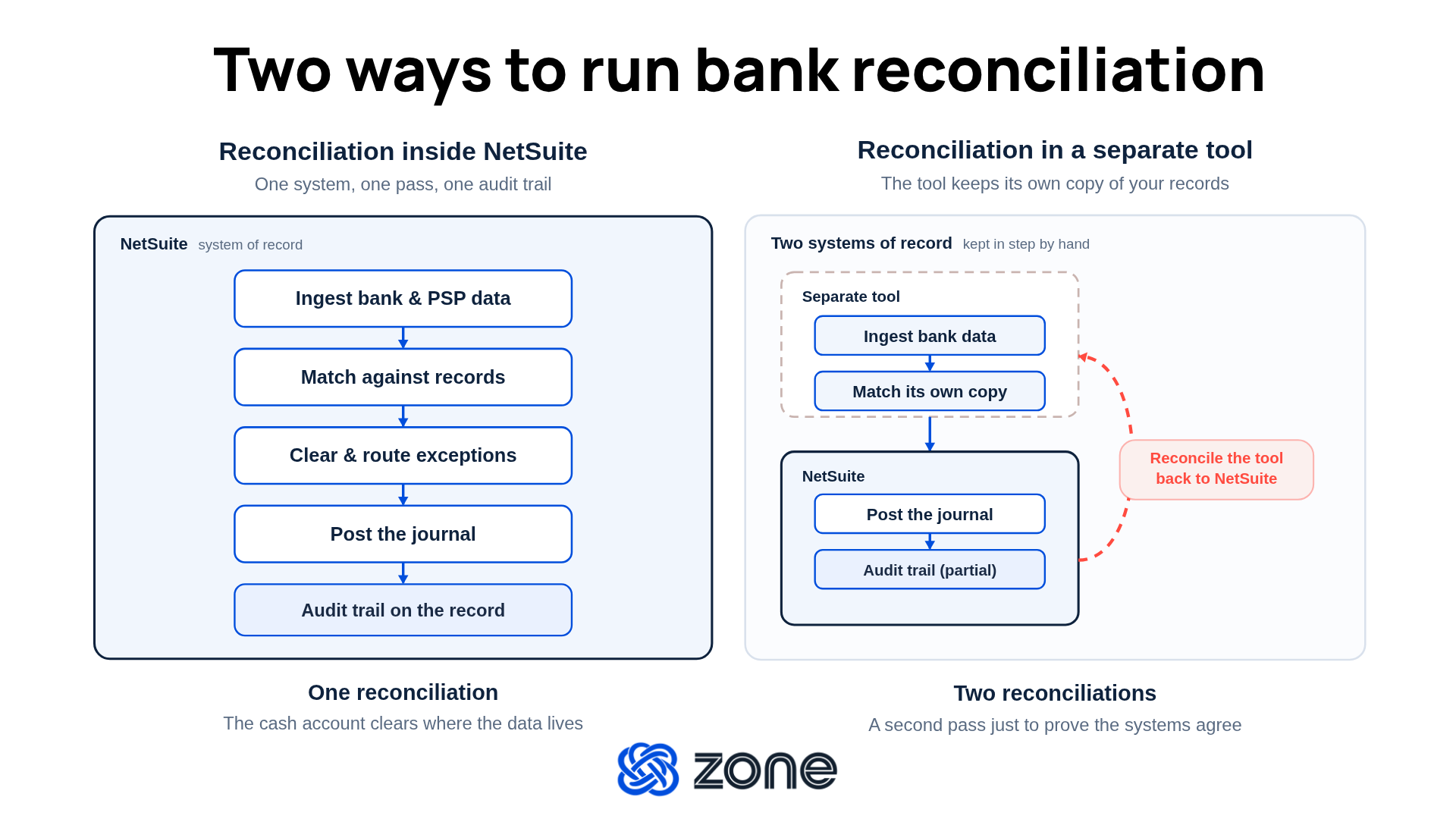
You can match your bank lines inside NetSuite, or you can match them in a tool that sits beside it. That choice impacts how much of the work comes back to your team.
“Bank reconciliation should happen directly in NetSuite,” says Patrick Norton, Solutions Principal at Zone & Co. “Rather than manually entering and matching transactions, automation can reconcile everything from invoices and credits to payments and expense reports based on either an import or direct connection with the bank.”
A tool outside NetSuite keeps its own copy of your records, matches against that copy and hands the result back as a posting. Your team then reconciles what’s in the tool to NetSuite. You’ve traded one reconciliation for two.
Automating exceptions, not just matches
NetSuite’s built-in bank reconciliation clears the lines where your books and the bank show the same amount on the same date. But month-end close drags on when exceptions pop up that take hours to resolve by hand.
Most reconciliation advice stops at “match on amount and date.” Those lines were never the problem. The hours, the errors and the month-end stress all live in the transactions that arrive bundled, short, in the wrong currency or net of a fee.
What it looks like to handle exceptions manually
Some unmatched lines take care of themselves. Outstanding checks and deposits in transit are timing differences that are expected, documented and cleared next period. But the six types of exceptions below may take longer and require more focused judgment.
- One payment covering several invoices. The bank shows a single amount, but NetSuite holds four open invoices that sum to it, minus a credit note. Amount matching comes up empty.
- Partial payments and short pays. A customer pays $1,980 against a $2,000 invoice. The amounts differ, so the line stays open until a person decides what the $20 was.
- Foreign exchange (FX) differences. The rate on the payment date and the rate in your books disagree. The transaction is right and the amount is off, which is the exact case that one-to-one matching drops.
- Bank fees and wire costs. The wire arrives net of a $35 fee. It’s the correct payment, arriving as the wrong number.
- PSP payouts. Stripe, Shopify, PayPal and Afterpay bundle hundreds of orders into one deposit, net of processing fees and often in another currency. One bank line can have hundreds of NetSuite records behind it.
- Batch payments. You pay 60 vendors in a run and the bank reports one debit but NetSuite’s records hold 60 bills.
Finance teams tell us the same thing. In Zone’s AI Impact vs. Hype in Finance 2026 report, we surveyed 565 finance professionals, and 29% named cash reconciliation as one of the AI use cases they consider overhyped. When asked where AI falls short, respondents described reconciliation tools that break down on exceptions and hand the work back to a person.
What exception handling looks like with AI in bank reconciliation
The six exceptions still arrive, but rules configured to your business can untangle the transactions and only surface true anomalies that require human judgment.
- One payment covering several invoices. A rule reads the reference or memo, finds the four invoices and the credit note that sum to the deposit and clears the line. Your accountant never needs to open it.
- Partial payments and short pays. A threshold rule clears the $20 gap automatically because it’s under tolerance and posts to the write-off account. If it’s over tolerance, it routes to review with the variance attached.
- Foreign exchange (FX) differences. The automated workflow posts the variance to gain/loss by entity and clears the line. Only variances outside your tolerance land in the review queue.
- Bank fees and wire costs. A rule recognizes the $35 gap as the bank’s fee, posts it to the fee account and clears the line before anyone opens it.
- PSP payouts. A rule identifies the payout by counterparty and memo pattern, pulls the 400 orders behind it, posts the processing fee and FX difference, and clears the deposit. The two orders that don’t tie out land in a review queue with their reasons attached.
- Batch payments. A rule matches the single debit to the 60 open bills by payment run reference and clears them all in one pass.
High-confidence lines clear the moment the feed lands, so the queue only holds what needs a human. Every exception that does land arrives with its reason attached like an FX variance of $412 or a bank line with no matching NetSuite record, so your accountant knows what went wrong before opening the transaction.
4 benefits of AI-assisted bank reconciliation in NetSuite
When bank reconciliation runs on rules and AI-assisted matching inside NetSuite, four things change for finance teams:
A month-end close that finishes days earlier
Reconciliation can be up to 95% faster, making your month-end close easier. The queue clears as the feed lands instead of building up all month, and the cash account is reconciled before your accountant reaches it. The first week of close stops belonging to the bank portal.
A faster close means earlier reporting to leadership, less overtime for your team and more room to actually analyze the numbers before the board deck goes out. AI-assisted matching handles the pattern recognition that fixed rules can'’ easily codify, like memo variations, counterparty aliases and description drift, so the auto-match rate climbs the longer the system runs.
Manual entry errors down to near zero
Rules-based clearing removes manual entry errors and AI-assisted matching flags the outliers a fixed rule would miss, like a payment landing in an account it’s never landed in before or a memo pattern that doesn’t fit any counterparty. Your accountant reviews a handful of anomalies instead of thousands of lines, and the transactions that clear automatically clear consistently every time.
Transaction volume that scales without new hires
Manual bank reconciliation scales linearly. Double the transactions and you double the hours, which eventually means doubling the headcount in AP and finance ops. Every new sales channel, new subsidiary or new bank account adds work that only more people can absorb.
Automation breaks that link. When rules clear the high-confidence lines and AI-assisted matching handles the messy middle, growing from 5,000 to 50,000 transactions a month doesn’t change what your team does each day. The queue holds the same shape regardless of the volume flowing through it and your team’s capacity stops being the ceiling on how fast the business can grow.
Real-time visibility into cleared vs. pending cash
Traditional bank reconciliation gives you an accurate cash position once a month, when the rec is finished. Everyone waiting on that number either waits or works off an estimate. Neither is good enough when you'’e deciding whether to move money between subsidiaries or accelerate a vendor payment.
Automated reconciliation running against a live bank feed updates cleared and pending cash as transactions land. AI-assisted categorization tags each line the moment it arrives, so you can see what’s cleared, what’s in a review queue and what’s still pending without waiting for month-end. Cash decisions get made on today’s data instead of last month’s.
Best practices for automating bank reconciliation inside NetSuite
Here are the practical ways teams get more out of NetSuite bank reconciliation as volume, complexity and new payment channels arrive.
Configure matching rules around how your transactions actually behave
Out-of-the-box logic covers amount, date and sometimes a reference number. Your transactions carry more than that, so it’s important that your matching rules can decipher:
- Recurring payments from the same vendors and platforms, which clear on the counterparty alone.
- Memo and description patterns your bank repeats every month.
- PSP and purchase order (PO) references, which follow a format a rule can read, such as “if the reference matches a PO format, auto-match.”
Patrick Norton gives an example of a working rule: “If the description contains ‘'transportation,’ then we’ll use the travel account and set the department.”
Matching rules like this don’t require scripts or developer time. You write the logic, and you can change it as your activity changes.
Set thresholds so small differences clear themselves
The same few differences from wire fees, processing fees, rounding and small short pays can occur every month. When a wire arrives $35 light, a threshold rule can recognize the gap as the bank’s fee, post it to the fee account and clear the line before anyone opens it.
Give each known difference type an account and a limit. A $25 or 2% tolerance being a common starting point:
- Wire and processing fees post to their own general ledger account.
- FX variances inside tolerance clear automatically and post the difference.
- Rounded numbers clear without a review step.
Build for growth from the start
A reconciliation that works at 500 transactions a month can collapse under 5,000. Ask these four questions to see whether yours will hold:
- Can you add a bank account and map it yourself, in an afternoon, without an IT ticket?
- Does a new subsidiary inherit your existing matching rules, or does someone rebuild them?
- Do FX differences post to the right account for multiple entities automatically?
- Do intercompany payments clear on both sides, or does one side sit open until quarter-end?
How to get started with reconciliation automation in NetSuite
You don't need a full rebuild to stop matching by hand. Bank reconciliation automation starts with one account, one set of rules and a clear picture of what you're fixing. Here's the sequence that works:
- Audit where the time goes. Which accounts take the longest? Which line types come back every month? Where do the errors get caught, and by whom?
- Set your benchmarks. Hours in the rec, number of open reconciling items, the share of lines that auto-match today. You can't show an improvement you never measured.
- Choose ERP-native over bolt-on. The matching happens where your records, permissions and audit trail already live, so nothing gets re-posted or re-proved.
- Define your rules and exceptions up front. Set your matching rules, your thresholds and your general ledger mappings before go-live, then decide who owns the review queue.
- Pilot on one high-volume account. Take the account that hurts most, usually the one carrying your PSP payouts, and prove it there.
- Monitor and tune. Track your auto-match rate. When a line type keeps landing in the queue, that's a rule you haven't written yet.
Automated bank reconciliation belongs in NetSuite
When you automate bank reconciliation in NetSuite, your team isn’t toiling away in spreadsheets or separate logins to ensure the transactions match and the exceptions are handled.
Automated bank reconciliation with Zone means bank, credit card and PSP data flows into NetSuite on a schedule and clear against your live records without a person in the middle. ZoneReconcile is built for exactly that workflow, matching where your transactions, permissions and audit trail already sit.
With ZoneReconcile, your team can:
- Reconcile where the records already live. Bank feeds match against your live NetSuite record, so there’s no export, no reimport and no second copy of your books to keep in step.
- Handle every exception with its reason attached. High-confidence lines clear automatically and the rest route to a review queue tagged with the reason, so your accountant opens the transaction already knowing what to fix.
- Catch the outliers your rules haven’t seen yet. AI-assisted matching flags the memo drift, counterparty aliases and one-off patterns that fixed rules can't codify, lifting the auto-match rate as the system learns your data.
- Clear PSP payouts without opening the report. One bank line covering 400 Shopify orders in another currency, net of processing fees, gets unbundled by rule and posted in the right place.
- See cleared and pending cash without waiting for month-end. Cash position updates as bank feeds land, so the CFO makes decisions on current data.