E-invoicing sends structured invoice data between systems over compliant networks like PEPPOL. It's not a PDF via email. It uses formats such as XML or UBL that systems can read and process automatically, allowing data to flow directly from one ERP to another without any manual data entry of vendor names, amounts or line items.
For finance teams managing high AP and AR volumes, that difference matters. Structured data validates automatically, approvals move faster and reconciliation happens without spreadsheets. And as governments worldwide mandate e-invoicing for compliance, it's shifting from a luxury to a necessity.
Key highlights:
- E-invoicing replaces paper and PDF invoices with structured, machine-readable digital formats that automate validation, transmission and processing across your entire invoice-to-pay workflow.
- Governments worldwide are mandating e-invoicing to close tax gaps and gain real-time transaction visibility – making compliance a requirement, not an option, for businesses operating across regions.
- Successful e-invoicing implementation requires native ERP integration, standardized vendor data formats and automated validation that catches compliance issues before invoices enter your system.
- Zone's e-invoicing for NetSuite automates invoice capture, validation and compliance management directly inside your ERP – eliminating third-party connectors and keeping your entire AP workflow audit-ready in one system.
What is an e-invoice?
An e-invoice is a data set with invoice details sent via a network that includes sender and receiver IDs for secure transaction processing. With all the necessary parameters attached, the network knows exactly:
- Where an invoice should be delivered
- Who is the specific customer or vendor that should be receiving it
The delivery process is fully automated, and in many cases, it happens within a few seconds. As a result, e-invoices are the modern way of sending and receiving invoices without relying on time-consuming manual processing.
Depending on your business needs, you can trigger this process by simply clicking a button or even fully automating e-invoice generation and sending within your ERP system.
Here’s a clear, plain-language definition of an e-invoice :
Learn more: read our comprehensive guide to e-invoicing
E-invoicing requirements: understanding the key components
A true e-invoice isn’t just an invoice that happens to be sent through email. It’s a structured data set built to specific standards that allow systems to read, validate and process it automatically. Governments and regulatory bodies worldwide define what information must be included to ensure invoices are legally valid, tax-compliant and traceable from sender to receiver.
Here's what makes up a compliant e-invoice (and why each component matters when finance teams are processing hundreds or thousands of transactions each month).
Core business identifiers
Every e-invoice starts with the basics: who's sending it, who's receiving it and how to track it. These identifiers ensure the invoice reaches the right party and can be referenced throughout its lifecycle – from approval to payment to audit. They include:
- Seller's legal name, address and tax identification number
- Buyer's legal name, address and tax identification number
- Unique invoice number for tracking and reconciliation
- Invoice issue date
Without standardized identifiers, invoices get lost in the system or routed incorrectly. E-invoicing networks use these fields to validate that both parties are registered and authorized to transact, reducing fraud and ensuring only legitimate invoices enter your AP workflow.
Transaction and tax details
Tax authorities require specific fields to verify compliance. Missing or incorrect VAT IDs, tax rates or currency codes can trigger rejections or audits. Structured e-invoicing ensures this data is captured consistently across all transactions, regardless of vendor or region.
E-invoices need complete transaction information to process payments and comply with tax regulations. This includes:
- Line item descriptions, quantities and unit prices
- Subtotals, tax amounts and invoice total
- Currency code and exchange rates (for international transactions)
- VAT or tax identification numbers
- Payment terms (such as net 30, net 60 or early payment discounts)
- Due date for payment
Data format and structure
E-invoices use structured data formats that machines can read – not PDFs or images that require human interpretation. XML (Extensible Markup Language) and UBL (Universal Business Language) are the most common formats, with each data element tagged so systems know exactly what they're processing.
Different regions and networks require specific formats. PEPPOL BIS (Business Interoperability Specifications) is widely adopted across Europe and parts of Asia-Pacific, for example while other regions may use country-specific standards. Your e-invoicing solution needs to handle the formats required by your trading partners and comply with local mandates.
Examples of common e-invoicing formats:
- UBL (Universal Business Language): Widely used in Europe via PEPPOL
- XML (Extensible Markup Language): Flexible format for structured data
- EDIFACT: Older EDI standard still used in some industries
- PEPPOL BIS: Standardized format for cross-border invoicing in PEPPOL network countries
Security and validation metadata
E-invoices include metadata that proves authenticity and maintains data integrity throughout transmission. This metadata is critical for preventing fraud and meeting regulatory requirements, and tracks the invoice’s journey through the network. It includes:
- Digital signatures to verify sender authenticity
- Timestamps for invoice creation and transmission
- Validation tokens from e-invoicing networks
- Encryption standards for secure data transmission
- Hash values to detect tampering or alterations
Finance teams can see when an invoice was sent, received and processed. This creates an audit trail that satisfies compliance requirements without manually collecting proof of delivery or acceptance.
Routing information for network delivery
E-invoicing networks need routing information to deliver invoices to the correct endpoint. This includes:
- PEPPOL participant IDs for sender and receiver
- Electronic addressing (endpoint IDs)
- Network access point information
- Country-specific routing codes (where applicable)
- Delivery confirmation protocols
PEPPOL uses unique participant identifiers registered in a central directory. When you send an e-invoice, the network looks up the recipient's ID, validates their registration and routes the invoice to their designated access point. There aren’t any manual lookups and there’s no risk of wrong addresses, giving your team automated delivery to the correct ERP or AP system.
How does e-invoicing work?
E-invoicing replaces manual invoice creation and delivery with an automated, end-to-end digital process. From the moment an invoice is generated to the point it's archived for compliance, every step happens electronically – reducing errors, accelerating approvals and keeping your business audit-ready.
Here’s how it works:
1. Invoice creation in the ERP or AP system
E-invoicing starts inside your ERP, where invoice data is generated from completed transactions, purchase orders or service agreements. Instead of creating a document for printing or emailing, the system structures the invoice data into a machine-readable format, capturing every field needed for processing and compliance in one step.
For finance teams using NetSuite, this happens automatically within existing workflows. When an invoice is ready to send, the system converts the data into the required e-invoicing format (such as XML or UBL) without anyone manually formatting fields or exporting files. The invoice is created once, structured correctly and ready for transmission.
2. Validation against business and regulatory rules
Before an e-invoice leaves your system, it runs through validation checks to ensure it meets both your business rules and regulatory requirements. The system then completes the following:
- Verifies mandatory fields, including invoice number, amounts, tax IDs and dates
- Validates tax calculations against current rates
- Runs compliance checks for country-specific e-invoicing mandates
- Validates against your business rules, such as spending thresholds, approval requirements and vendor status
- Flags errors with specific correction prompts
This step catches errors before they become problems. Missing VAT IDs, incorrect tax rates or incomplete vendor information get flagged immediately – not after the invoice has been rejected by the recipient's system or a tax authority.
3. Secure transmission through e-invoicing networks
Once validated, the e-invoice is transmitted through a secure network like PEPPOL or via Electronic Data Interchange (EDI) protocols. These networks act as trusted intermediaries, routing invoices to the correct recipient based on registered participant IDs and ensuring data integrity throughout transmission.
The network handles all the technical complexity, including encryption, authentication and delivery confirmation. Your ERP sends the invoice to the network's access point, and the network delivers it to the recipient's system within seconds, completing the following processes:
- Encrypted transmission over secure networks (PEPPOL, EDI, etc.)
- Participant IDs used for routing to the correct recipient
- Network validates sender and receiver credentials
- Delivery confirmation sent back to sender
- All transmission activity is logged for audit trails
4. Automatic matching and reconciliation
When an e-invoice arrives in the recipient's AP system, it's automatically matched against existing purchase orders, delivery receipts and supplier invoices in a process called 3-way match. If the invoice has correct and matching information, the system completes the following processes:
- Automatic matching to the purchase order and goods receipt
- Immediate flagging of discrepancies for quantity, price or terms
- Exception handling for invoices that don't match
- Approval routing based on predefined workflows
- Payment processing triggered automatically for matched invoices
- Real-time visibility into AP status and cash flow
This is where e-invoicing delivers the biggest efficiency gains. Finance teams aren't manually comparing invoice line items to purchase orders or hunting down receiving documents. The system does it automatically, and only exceptions require human attention. Payment processing becomes predictable, vendors get paid on time and month-end close doesn't involve reconciliation marathons.
5. Archiving and compliance storage
After an e-invoice is processed and paid, it's archived in your ERP with full traceability. Every step – creation, validation, transmission, approval, payment – is logged and stored to meet regulatory retention requirements. You’ll gain the following benefits:
- Complete audit trail from creation to payment
- Long-term storage in structured format (not just PDFs)
- Searchable archives for quick retrieval
- Retention period management based on regulatory requirements
- Tamper-proof records with digital signatures and timestamps
- Easy export for audits or regulatory reporting
E-invoicing systems maintain these records in their original structured format, ensuring data integrity for the required retention period (which is typically seven to 10 years, depending on jurisdiction).
Traditional vs electronic invoicing: main differences
Global growth of e-invoicing regulations
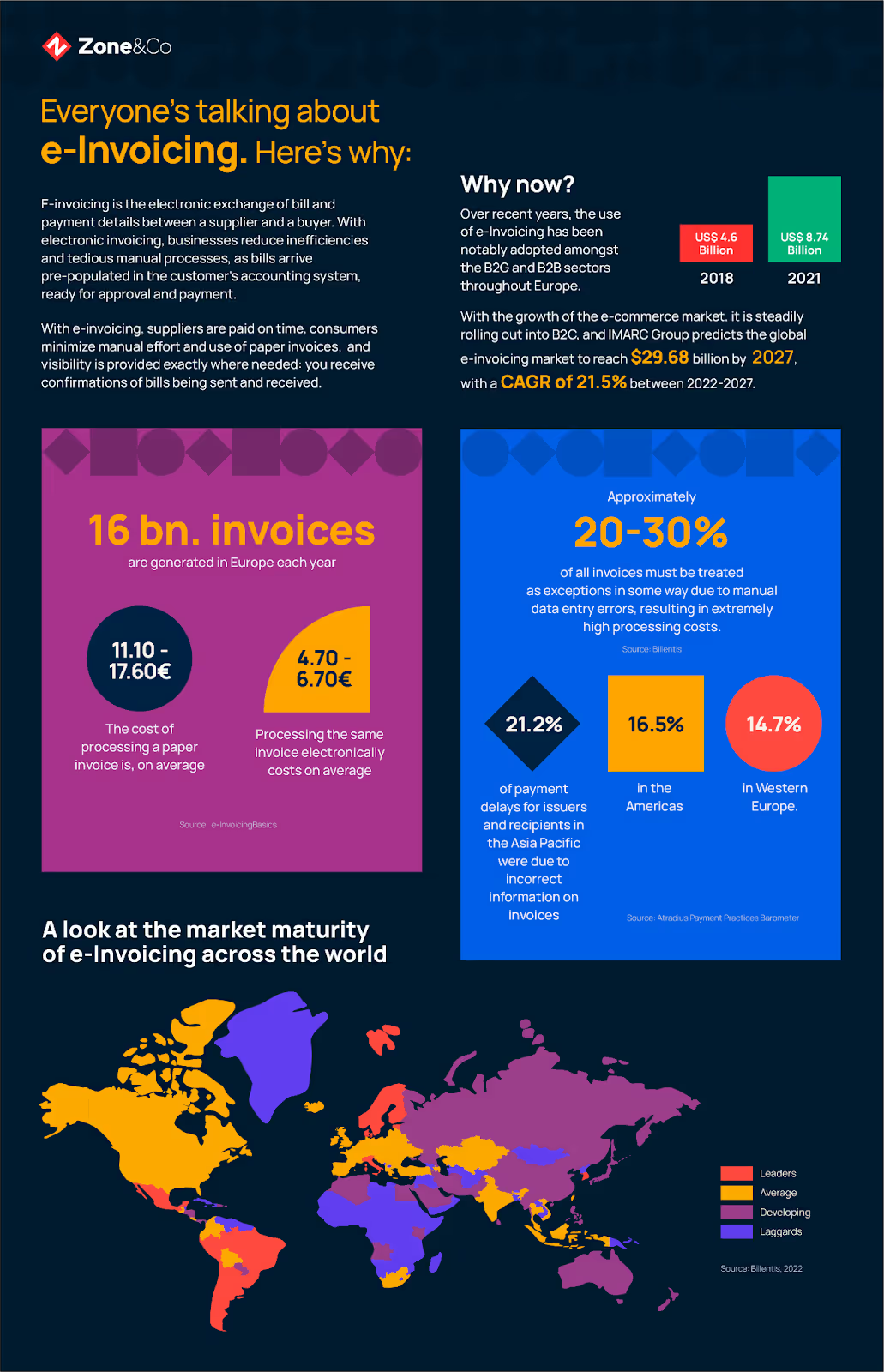
E-invoicing has shifted from a “nice to have” to a regulatory requirement across dozens of countries. Governments worldwide are mandating structured digital invoicing to close tax gaps, eliminate fraud and gain real-time visibility into business transactions.
The infographic below captures this global transformation. It shows current adoption rates by region, the volume of e-invoices processed each year, documented cost savings compared to paper-based processes and projected growth through 2030.
How to implement enterprise e-invoicing solutions in your ERP
Moving to e-invoicing isn't a rip-and-replace project. When you implement e-invoicing within your ERP, you're building on existing workflows – automating invoice capture, validation and transmission without disrupting how your team operates. Here’s how to get started with implementation.
1. Assess your current invoicing and payment workflow
Before you implement anything, map out how invoices move through your organization today. Walk through the entire process – from the moment a vendor invoice arrives to when payment hits their account. Identify where manual work happens: data entry, approval routing, exception handling and reconciliation. Look at invoicing volume by entity, region and currency to understand where automation will have the biggest impact.
This assessment reveals bottlenecks your team has been working around for years. Common findings include:
- Invoice approval delays caused by manual routing or unclear hierarchies
- Duplicate data entry when invoices arrive via email then get keyed into the ERP
- Reconciliation gaps between what's approved and what's actually paid
- Compliance risks in regions with e-invoicing mandates you're not meeting
- Version control issues when invoices get edited outside the system
2. Identify systems and data that require integration
E-invoicing doesn't work in isolation. Look at every system that touches your invoice-to-pay process – your ERP, procurement platform, approval workflows, banking systems, tax compliance tools. Determine what data needs to flow between these systems and where integrations already exist. If you're running NetSuite with third-party AP tools, this is where you'll see how many handoffs and syncs are actually happening behind the scenes.
The goal is to bring as much of this workflow as possible inside your ERP, reducing the number of systems you're maintaining. Key integration points to evaluate include:
- Vendor master data and how it syncs across procurement and finance systems
- Purchase order data feeding into 3-way matching logic
- Approval hierarchies and delegation rules that need to carry over
- Banking and payment processing connections for automatic reconciliation
- Tax calculation engines validating rates based on jurisdiction
3. Select an e-invoicing system provider that supports your regions
Not all e-invoicing solutions handle every region's requirements. If you operate in Europe, you need PEPPOL support. If you're doing business in Mexico, CFDI compliance is non-negotiable. If you're expanding into Asia-Pacific, you need a provider who understands the regulatory landscape in Singapore, Australia and beyond. Choose a provider with proven experience in your markets – someone who's already navigated the mandates, format requirements and network integrations you'll need.
Beyond regional coverage, evaluate how the solution fits your ERP architecture. Look for providers offering:
- Native ERP integration that doesn't require middleware or constant maintenance
- Support for multi-entity, multi-currency operations without custom development
- Real-time validation against local tax rules and e-invoicing mandates
- Scalability to handle transaction volume growth without performance issues
- Established relationships with regional e-invoicing networks and clearance systems
4. Map invoice fields and test end-to-end automation
Once you've selected a provider, the real work begins: mapping your invoice data to the structured formats required by e-invoicing networks.
This isn't just technical field mapping. You're defining how your business data translates into compliant e-invoices that meet regulatory requirements in every jurisdiction where you operate. Work with your provider to map line items, tax codes, payment terms and vendor identifiers to the correct XML schema for each region, and run end-to-end tests that include:
- Invoice creation with all required fields populated correctly
- Validation against regional e-invoicing mandates and tax rules
- Transmission through the appropriate network with delivery confirmation
- Receipt and matching in the buyer's system triggering approval workflows
- Exception handling when invoices don't match purchase orders or have data errors
5. Train staff and roll out in phases
Your AP team doesn't need to become e-invoicing experts overnight. Focus training on what changes in their day-to-day work – how invoices arrive in the system, how exceptions get flagged, how approvals route differently. Make sure they understand what the system is doing automatically so they know when to step in and when to let automation handle it. Walk them through the new workflows with real examples from your test environment.
Phase your rollout by starting with a single entity or region where you can control variables and learn from the process. Key rollout phases include:
- Pilot with a small vendor group processing invoices through the new system
- Expand to high-volume vendors once the team is comfortable with workflows
- Add regions and entities methodically based on regulatory timelines
- Monitor exception rates and approval cycle times to refine automation rules
- Scale to full adoption once you've validated accuracy and compliance across scenarios
Learn more: how to prepare for electronic invoicing
Best practices for your e-invoice workflow
E-invoicing implementation is just the start. Long-term success depends on how well your workflow adapts to changing regulations, scales with business growth and maintains accuracy across all your business operations. These best practices help finance teams avoid common pitfalls and build e-invoicing processes that actually deliver on the promise of automation.
Choose a platform that integrates with your ERP
The worst e-invoicing implementations happen when finance teams bolt another system onto their tech stack. You end up with invoices living in one platform, approval data in another and financial records in your ERP – all requiring manual reconciliation. Choose a finance platform that works inside your ERP, not around it.
When e-invoicing runs natively in NetSuite or your core system, every invoice is automatically tied to your chart of accounts, vendor records and payment history without syncing delays or data gaps. Native integration eliminates the technical debt that comes with third-party connectors. Key integration requirements include:
- Direct access to vendor master data without duplicate records or sync conflicts
- Automatic posting to the correct GL accounts based on invoice coding
- Real-time visibility into invoice status without logging into separate platforms
- Unified approval workflows using your existing ERP hierarchies
- Single audit trail capturing every action from receipt to payment
Standardize data formats across vendors and partners
Your vendors aren't all sending invoices the same way. Some use XML, others send PDFs, a few still mail paper invoices. This inconsistency forces your AP team to handle each format differently, manually entering data from PDFs while structured invoices flow through automatically.
Work with your vendor base to standardize on e-invoicing formats that your system can process without manual intervention. The more vendors you convert to structured formats, the less manual work your team does. Common standardization efforts include:
- Vendor onboarding processes that explain your e-invoicing requirements upfront
- Template sharing so vendors know exactly which fields are mandatory
- Data validation rules that catch incomplete or incorrect invoices before they enter your system
- Consistent coding schemes for cost centers, GL accounts and tax classifications
- Regular vendor audits to identify and fix recurring data quality issues
Prioritize compliance and auditability
E-invoicing mandates aren't static. Governments update requirements, add new fields and change validation rules – sometimes with minimal notice. Your e-invoicing workflow needs to adapt quickly without disrupting business operations.
Build compliance into every step. When auditors or tax authorities come calling, every invoice should be instantly retrievable with a complete history of actions taken. Ultimately, ensuring compliance means building controls that protect your business even when regulations shift. Critical compliance elements include:
- Automated updates when regional e-invoicing mandates change
- Maintaining compliance through validation rules that catch errors before invoices leave your system
- Digital signature preservation proving invoices haven't been altered post-transmission
- Retention period management based on the longest requirement across all jurisdictions where you operate
- Audit trail completeness showing who approved, when payment was made and why exceptions occurred
Communicate early with suppliers and internal teams
Your vendors don't automatically know you're switching to e-invoicing. If you flip the switch without warning, you'll get confused calls, rejected invoices and vendors who keep sending PDFs because that's what they've always done.
Start communications months before go-live for both internal and external clients – explain what's changing, why it matters and what vendors need to do differently. Give them resources: onboarding guides, format examples, contact information for questions. And when it comes to internal teams, make sure they understand:
- How invoice arrival and routing changes under the new system
- What exceptions look like and how to resolve them quickly
- Where to find invoice status and approval history
- Who to contact when something doesn't work as expected
- Timeline for rollout across different entities or vendor groups
Automate validation and continuous performance monitoring
E-invoicing without validation is just faster chaos. Build automated checks that catch errors the moment an invoice enters your system – wrong tax rates, missing purchase order numbers, duplicate invoice IDs, amounts that exceed tolerances. The system should flag these exceptions and route them to the right person for resolution, not let them sit unnoticed until month-end close. AP automation software handles this validation continuously, learning from corrections your team makes and refining its accuracy over time.
Monitoring doesn't stop after go-live. Track performance metrics that tell you whether e-invoicing is actually delivering value. Key metrics to monitor include:
- Invoice processing time from receipt to approval compared to pre-automation benchmarks
- Exception rates by vendor to identify training opportunities or data quality issues
- Straight-through processing percentage showing how many invoices require zero manual intervention
- Days payable outstanding (DPO) trends indicating whether you're capturing early payment discounts
- Compliance failure rates flagging regions or vendors that need process improvements
Streamline your e-invoicing process with Zone
Zone's e-invoicing for NetSuite brings structured invoice processing, validation and compliance management directly into your ERP. There are no third-party connectors, which means no syncing delays. Instead, you’ll get automated invoice workflows that scale with your business across regions, entities and currencies.
ZoneCapture handles everything from initial invoice receipt to GL posting – with built-in compliance for global e-invoicing mandates.
Key features that make Zone the right choice for NetSuite users:
- Native NetSuite integration: E-invoicing runs inside your ERP, not as a bolt-on requiring constant maintenance
- Global compliance support: Automatic validation against regional mandates including PEPPOL, CFDI, SDI and emerging requirements
- AI-powered invoice capture: Structured data extraction from any format with up to 99% accuracy, that continuously learns with GenAI
- Automated 3-way matching: Instant validation against purchase orders and receipts without manual review
- Multi-entity scalability: Handle invoices across subsidiaries, currencies and tax jurisdictions from a single platform
- Real-time exception handling: Intelligent routing and approval workflows that adapt to your business rules
- Audit-ready archiving: Compliant retention with tamper-proof storage and instant retrieval during audits
Book a demo today and see how Zone & Co can help your enterprise streamline its e-invoicing process.